 Talpha










How it works
It is better to place a chatbot in a corporate messenger (Slack, Telegram). This can be an independent script or part of a large adaptation program in a chatbot. For example, you can add a bot to adapt on the first working day.
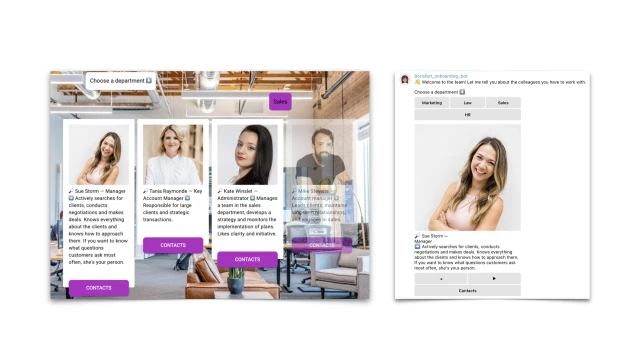
When a newbie goes to work, they get access to the bot: by an event in the system, a link, or a QR code. The employee selects a department and the bot provides information about colleagues: photo, first and last name, position, main functions. You can add other information: work schedule, office presence or remote location, etc.
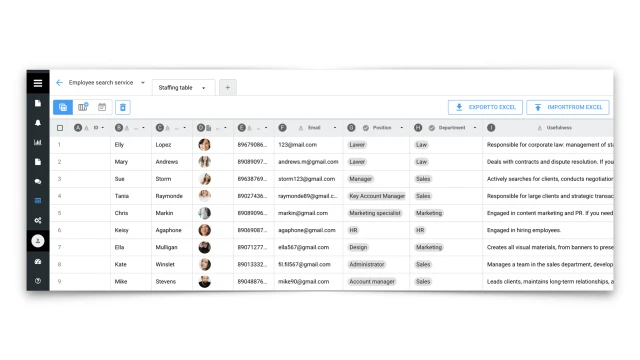
Information about the company's employees is contained in the staffing table, a table that needs to be uploaded to the system. You can change the order of columns, their types, and add photos. The staffing table is also useful for other chatbot scripts: employee authorization in the bot, document approval, etc.
How to set up the bot
✔️ Register in the BuddyBot constructor, create a project and add the template "Search for employees in the company".
✔️ Add a staffing table with information about employees to the table.
✔️ Connect Telegram or another messenger.
✔️ Test the script on yourself. If you have any questions about self-configuration, contact our community on Telegram.
If you want to master the basic setup of chatbots for HR, register for the mini-course HR Tech Course «Do It Yourself».