




header.phone_number boris@borisbot.com

Exit Interview AI Voice Bot for HR

AI bot conducts exit interviews with voice, asks follow-up questions, and delivers a structured summary to HR.

You need to log in to see the interactive example.

You need to log in to see the interactive example

show More

Copyright protection from copying

landing.complain

HR changes the employee status to "Offboarding" in Workday — the bot instantly messages them on Telegram, Slack, or WhatsApp. It explains why the interview matters and guarantees anonymity: only HR sees the data, not the direct manager. The employee picks a reason for leaving, records a voice message or types — whichever is easier. The AI transcribes the voice, asks 2–3 follow-up questions, and asks: can we retain you? At the end it generates a structured summary for HR. Until the interview is complete, the offboarding package does not start.

Why it works

🎙️ Voice is more honest than text — tone and free-form answers reveal what people won't write in a form

🤖 AI digs deeper — asks follow-ups based on the actual answer, won't accept "everything was fine"

📊 100% coverage — auto-triggered from the HR system, no departure goes without an interview

🔒 Anonymity built in — the employee knows the direct manager never sees their responses

KPI of the solution

📈 Near 100% completion — offboarding package is gated behind the interview

⏱ 0 HR hours per interview — the bot runs the conversation, the summary is ready automatically

🔍 Patterns without manual analysis — recurring reasons surface systemic issues quarter over quarter

💡 Last-chance retention signal — the bot asks "can we keep you?" and sends the answer to HR before the last day

Who it's for

Built for an IT company example, adapts to any company with regular staff turnover: tech companies, banks and fintech, retail, manufacturing, consulting, logistics. No coding required.

How it works

The HR system (Workday, HubSpot, or Zapier) changes the employee's status — the bot instantly messages them on Telegram, Slack, or WhatsApp. It explains why the interview matters and guarantees anonymity: only HR sees the data, not the direct manager. The employee picks a reason for leaving, records a voice message or types. The AI asks 2–3 follow-up questions based on the responses and asks: can we retain you? It generates a summary and sends it to HR — only then does offboarding begin.
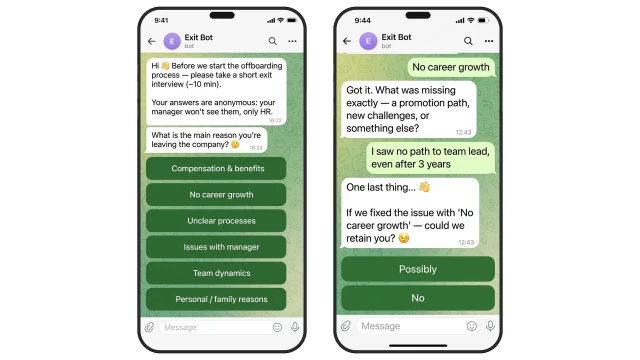
The bot explains why the interview matters and guarantees anonymity upfront — removing the barrier to honest feedback. The employee picks from 6 departure reasons, the AI probes deeper, and finally asks: if we fixed this, could we keep you? That retention signal reaches HR before the last working day.
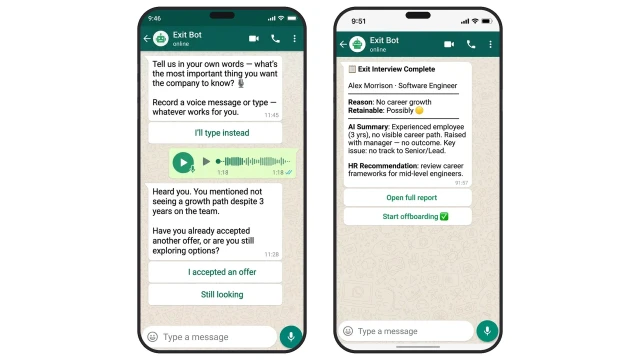
The AI runs the interview adaptively — each question is shaped by the previous answer. Voice messages are transcribed, key words become the basis for follow-up questions. This is not a form — it's a live dialogue that surfaces real reasons.

What is assessed:

❓ Primary reason for leaving (6 categories)

✅ AI probes: was it a specific trigger, long-building tension, or a sudden incident?

❓ Voice or text explanation — in their own words

✅ AI transcribes, analyses tone, and asks 2–3 targeted follow-ups

❓ Could the employee be retained if the issue were resolved?

✅ Retention signal captured as a separate field — HR sees it immediately

❓ What they valued about the company; what they'd recommend improving

✅ AI produces a brief summary and risk score for HR
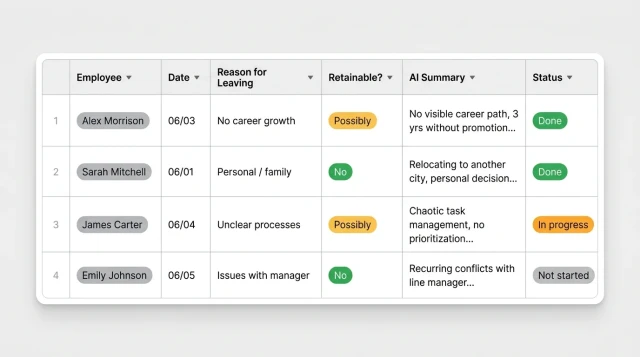
HR sees all exit interviews in one table: reason, retention signal, AI summary, and completion status. Patterns emerge across the quarter without manual analysis — recurring reasons highlight systemic issues.

How to get started

The template runs on the Business plan from $25/mo. Setup with the BuddyBot team takes 1–2 days, no coding required.

1. Book a demo

We'll walk through your offboarding process, align on interview questions and retention signal logic

2. Connect your HR system

Set up a webhook from Workday, HubSpot, or Zapier — the bot triggers automatically on status change. Alternative: HR sends a personal link

3. Configure questions and categories

Adjust the list of departure reasons, add industry-specific questions, set AI tone

4. Set up HR notifications

Choose where AI summaries land: Telegram, Slack, WhatsApp, or email

5. Run a pilot

Test the flow with 2–3 employees, refine questions, then roll out company-wide

What else you can add

The template expands to fit your processes:

🔗 HR systems — Workday, HubSpot, Zapier: auto-trigger interviews on status change, no HR involvement needed

📊 BI analytics — export interview data to Power BI or Tableau for quarterly attrition analysis

✉️ Email notifications — AI summary sent to HR director immediately after interview completion

🔁 Offboarding bot — interview automatically triggers full offboarding: handover instructions, asset return, exit checklist

Frequently asked questions

How does the bot know an employee is leaving?

When integrated with an HR system (Workday, HubSpot, Zapier), the bot triggers automatically on status change. Without integration, HR sends a personal link manually or via QR code.

Can the employee type instead of recording voice?

Yes. The bot offers both options: record a voice message or type. The employee chooses what's comfortable. The AI analyses the response either way.

What happens to the voice message?

The AI automatically transcribes the voice message to text. Key themes are extracted and used to form 2–3 follow-up questions. The audio is not stored — only the text transcript.

How does the retention question work?

At the end of the interview the bot dynamically inserts the chosen reason: "If we fixed the issue with [reason] — could we retain you?" The answer (Possibly / No) is recorded as a retention signal and shown in the HR table as a separate column.

What does offboarding doesn't start until interview is done mean?

Until the interview is complete, the employee doesn't receive the offboarding package: handover instructions, contacts for knowledge transfer, document links. This motivates completion without pressure.

How is anonymity guaranteed?

Only HR (the director and the team with access to the BuddyBot table) sees the employee's responses. The direct manager never receives the data. This is stated clearly in the bot's first message — which increases response honesty.

What does HR receive at the end?

An AI summary containing: reason for leaving, retention signal (Possibly / No), conversation tone (neutral / disappointed / positive), key themes and a recommendation. The summary is sent to the HR messenger and saved to the BuddyBot table.

How long does the interview take?

On average 8–12 minutes. Voice message: 1–2 minutes. AI follow-up questions: another 3–5 minutes. The employee goes at their own pace and can pause — the bot saves progress.

Which messengers does the bot work in?

Telegram, Slack, and WhatsApp. HR chooses the channel during setup. The bot adapts to each messenger's interface. Multiple channels can be active simultaneously.

Can we customise questions and departure categories?

Yes. During template setup HR adds or changes departure reason categories, adds industry-specific mandatory questions, and configures AI tone and summary format.