




header.phone_number boris@borisbot.com

Employee Task Tracking Bot: Daily Report

Bot polls employees on active tasks every morning, records voice replies, sends AI summaries to the manager.

You need to log in to see the interactive example.

You need to log in to see the interactive example

show More

Copyright protection from copying

landing.complain

Each morning, the bot pulls the active task list from your tracker (Jira, Asana, Linear, or Monday.com) and messages each team member in Telegram or Slack. The employee responds by voice or text — one reply per task, about a minute total. Replies are logged to a table; AI generates a summary: who is on track, who has a blocker, who has not replied. The manager gets a structured report without any manual status updates.

Why it works

📌 Task-specific check-ins — the bot knows each employee's task list and asks about each one directly
🎙 Voice replies — employees respond in seconds without switching context
🤖 AI summary — the report is ready by the time the manager starts their day, with no manual effort
📊 Cumulative knowledge base — every standup adds to a structured record of tasks, blockers, and team communication

KPIs

⏱ Check-in takes under 1 minute per employee
📋 100% of active tasks tracked daily
🚫 Blockers surface the same day they occur
📈 Sprint completion report generated automatically

Who it's for

Built for a development team at a software company, adaptable for any team using a task tracker — product, design, operations, or support.

How it works

The bot connects to your task tracker (Jira, Asana, Linear, or Monday.com) and updates the team's task list every few hours. Each morning it messages every team member in Telegram or Slack — asking about each active task from the tracker. The employee responds by voice message or text. Replies are logged to a table; AI generates a summary: who is on track, who has a blocker, who hasn't responded.
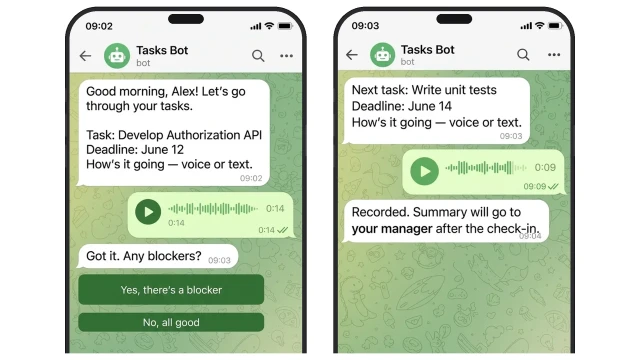
Specific tasks — specific replies: the bot knows each person's task list from the tracker and asks about each one. The employee replies by voice or text in under a minute.
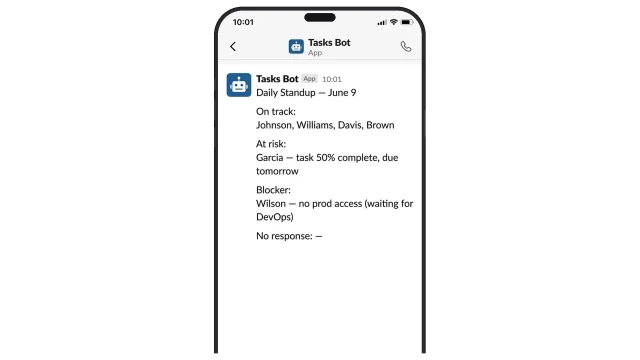
The bot analyzes each employee's reply and automatically generates a summary for the manager.

What AI analyzes:

❓ Employee writes "waiting on DevOps" or "can't continue without X"

✅ AI marks the task as "Blocker" and includes it in the summary with a description

❓ Task progress hasn't changed in 2+ days, deadline is 1-2 days away

✅ AI marks it as "Deadline risk" and highlights it in the manager's report

❓ Employee hasn't responded by 10:30

✅ AI includes them in the "No response" list and sends a reminder
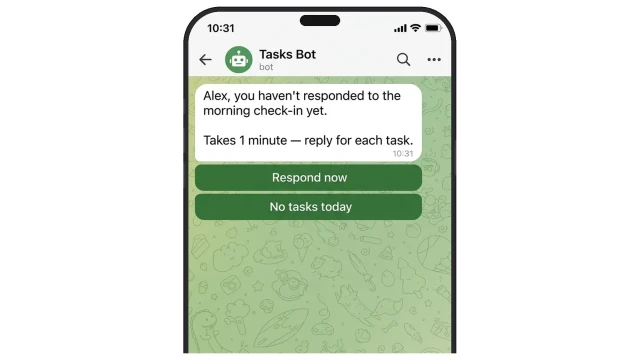
One reminder at 10:30 — the bot doesn't spam, but makes sure no one silently skips the check-in
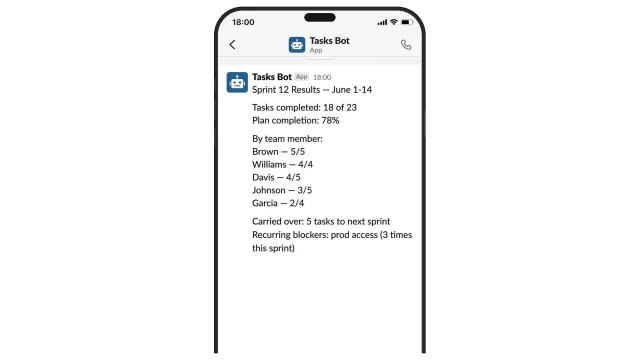
Sprint results automatically: plan completion, each team member's contribution, recurring blockers over the period
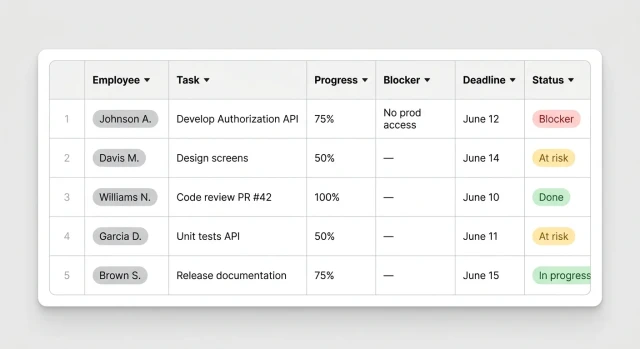
The whole team in one table: task progress, blockers, deadlines, statuses — the foundation of a knowledge base on tasks and team communications, built up automatically

How to get started

The template runs on the Business plan. Custom setup for your team — from $500 one-time.

1. Book a demo

We'll discuss your task tracker, team size, and check-in schedule — and suggest the best configuration

2. Pre-setup call

We collect your tracker access, team list, and task categories — then configure the bot

3. Connect integrations

Link your task tracker, Slack or Telegram workspace, and optionally a Google Sheet for reporting

4. Test run with the team

We run a test check-in with 3-5 employees and confirm the reports look right

5. Launch

The bot goes live. We stay in touch for 2 weeks to fine-tune the setup

What else can be connected

  • 📧 Email digest — send the daily summary to the manager's inbox right after the morning check-in
  • 💬 Slack channel — post the daily team summary to a shared Slack channel

Frequently asked questions

Which task trackers are supported?

Jira, Asana, Linear, and Monday.com. Integration is set up on request — reach out and we will discuss connecting your tracker.

How often does the bot sync tasks?

The sync schedule is flexible — tailored to your team's rhythm. Once a day before the morning check-in, or several times a day.

Can employees respond by text instead of voice?

Yes. Voice messages are the recommended format — faster and more natural — but text replies work just as well and are transcribed by AI the same way.

What happens if an employee does not respond?

The bot sends one reminder. If there is still no reply, the employee is included in the "No response" list in the manager's daily report.