






header.phone_number boris@borisbot.com

Slack Onboarding Bot: Meet the Team

Welcomes new hires in Slack, asks a few questions about them, and posts an introduction to the team channel.

You need to log in to see the interactive example.

You need to log in to see the interactive example

From the user Borisbot

Copyright protection from copying

landing.complain

When a new employee joins the Slack workspace, they usually stay invisible — no one knows who arrived or what they do. This template automatically solves the introduction problem: the bot messages the new hire, collects a few facts about them, and posts an introduction to the team channel. No HR involvement, no manual steps.

Why it works

👋 Automatic trigger — the bot reacts to every new workspace member without manual launch

🎯 Introduction from day one — new hires are never invisible in the workspace

🔄 Consistent experience for everyone — every employee goes through the same onboarding flow

⚡ Zero load on HR — onboarding runs itself, even on weekends

Solution KPIs

⏱ −30 min of HR time per new hire — greeting and data collection are fully automated

📊 100% coverage — no new member goes unnoticed

🤝 Fast team integration — colleagues meet the new hire on day one

📋 Team roster updates automatically

Who it's for

Built for IT companies, adaptable to any team with a Slack workspace: tech companies, digital agencies, startups, remote teams, corporate departments.

Launch: 1 hour of your data → configured in a day → the bot greets your first new hire on launch day.

How it works

A new employee accepts the email invite and enters the workspace. The bot immediately messages them: offers to introduce them to the team and asks three questions — what they'll be working on, where they came from, and something interesting about themselves. Based on the answers, it drafts a post and publishes it in #general: "Meet Alina — our new Product Manager. Came from e-commerce, loves running. @alina, welcome!" Colleagues see it, react — introduction complete.
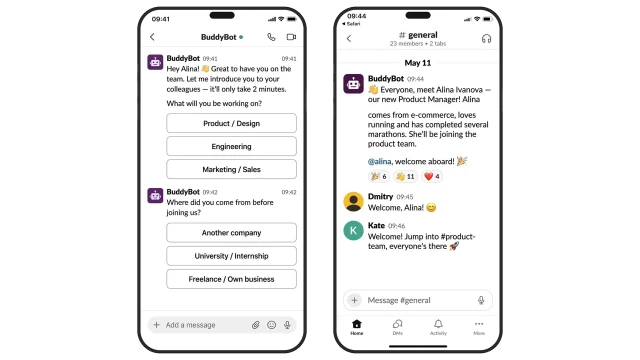
The bot asks just three questions — that's enough to introduce someone to the team. The questions are simple and easy to answer, so the new hire doesn't feel overwhelmed on their first day. What the bot asks: ❓ What will you be working on? ❓ Where did you come from? ❓ Something interesting about yourself for the team?
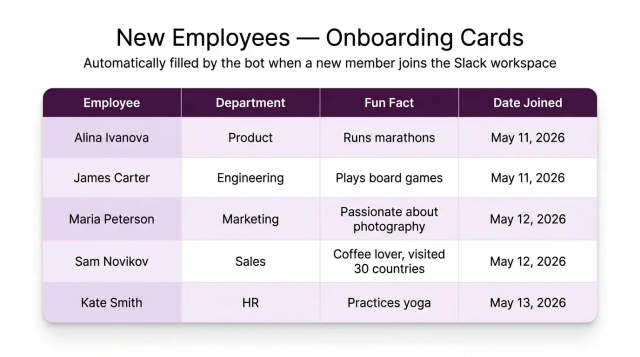
Employee cards for all new hires are automatically saved — HR can see who joined, which department, and when.

How to get started

1. Choose a subscription plan

The "Starter+" plan from $25/mo — includes everything you need to launch the bot.

2. Copy the template and book a call

After copying the template, book a call with our manager — they'll help with the setup.

3. Prepare your intro questions

Set up 2–3 questions tailored to your team. Recommended onboarding questions:

• What will you be working on in our team?

• Where did you work before?

• What are your hobbies outside of work?

4. Connect your Slack workspace

Our manager will help add the bot to your workspace and choose the channel for introductions.

What else you can add

Reminder: the bot follows up with the employee if they didn't answer the questions — 24 hours after joining.

Data export: all new employee cards are available for download in Excel from the BuddyBot dashboard.

HR notifications: the bot messages the HR manager directly in Slack whenever a new employee card is ready.

Frequently asked questions

How does the bot know about a new employee?

Slack sends an event to the bot whenever a new member joins the workspace. No manual trigger needed.

What if the employee didn't answer the questions?

The bot sends one reminder 24 hours later. If there's still no response, HR can see the status in the dashboard.

How many questions does the bot ask?

3 questions with buttons by default. The number and wording can be customized for your team.

Where are the answers saved?

All answers are saved in BuddyBot and can be exported to Excel from the dashboard.

Which channel gets the introduction post?

Set during configuration — any public channel in your workspace, e.g. #general or #introductions.

Does it work for large teams?

Yes, the bot handles any number of new employees simultaneously — no queues, no delays.

Can it be adapted for a different industry?

Yes. The template works for any team with a Slack workspace — startups, agencies, corporate departments. No coding required.