





How it works
You need to log in to see the interactive example.
You need to log in to see the interactive example
Copyright protection from copying
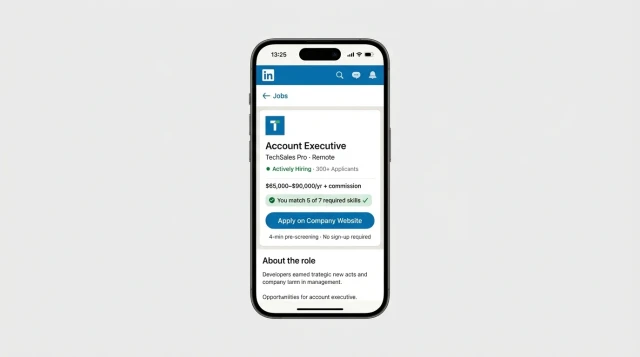
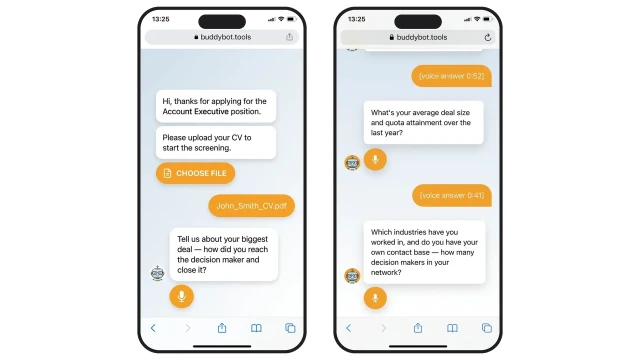
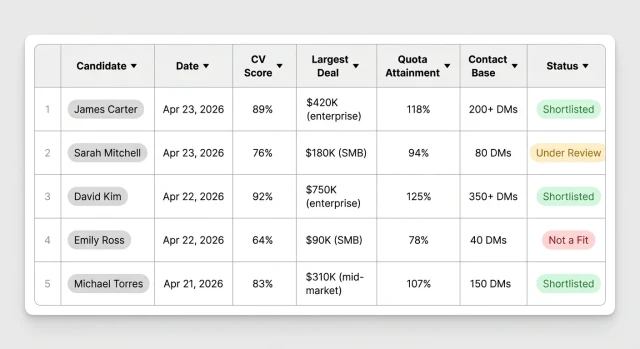
A company posts an Account Executive vacancy on LinkedIn — the "Apply" button opens a browser-based bot. The candidate uploads a CV and answers voice questions about their largest deals, quota attainment and contact database. AI analyses the transcript using criteria: deal size, sales cycle, industry knowledge and decision-maker contacts. The recruiter gets a scored shortlist without a single call or manual screening.
🎯 Pre-qualification before the HR call — only candidates with proven deal-closing experience
📞 AI evaluates the specificity of numbers: deal size, quota attainment, decision-maker database size
🏭 Industry knowledge and existing contacts — key markers of a strong AE
🔗 One click from LinkedIn — no forms, no registration, no ATS setup required
⏱ −70% recruiter time on initial screening
📊 3× fewer irrelevant candidates invited to interviews
🌐 24/7 screening — the bot works while you sleep, no missed applications
📋 −15 hours/month on manual CV processing with 50+ candidate flow
Built for hiring Account Executives at SaaS companies; adapts to any business with high-volume sales hiring: fast-growing startups, HR agencies, enterprises hiring enterprise sales reps, tech companies, and recruiting platforms.
1. Choose a subscription plan
Starter+ plan from $19/month — includes everything you need to launch the bot.
2. Clone the template and book a setup call
Clone the template to your account. The BuddyBot team configures the bot for your AE vacancy in 1–2 days.
3. Add the link to your LinkedIn job post
Add the bot link to the job description or share via InMail. Candidates complete the screening in their browser — no registration or app installation needed.
ATS integration: send screening results to Greenhouse, Lever, Workday or HubSpot Recruit via Webhook.
Additional questions: add a case — "Walk me through a complex enterprise negotiation involving legal and procurement" — to test enterprise sales skills.
Results table includes columns: Candidate · Date · CV Score · Largest Deal · Quota Attainment · Contact Database · Status — everything for quick comparison.
Auto-notifications: the candidate gets a confirmation immediately after screening, HR gets a notification in Telegram, Slack or by email.
Will candidates drop off — won't they abandon the screening?
Based on similar solutions, conversion to completed screening is 55–70%. The bot asks 3–4 questions, each voice answer takes up to 2 minutes, and the interface is a familiar mobile browser with no app installation.
How is candidate personal data handled?
CVs and voice answers are stored in BuddyBot's secure storage. Data is deleted on request in accordance with GDPR. The candidate is notified about recording before the screening begins.
What if the candidate doesn't want to answer by voice?
Voice answers are optional — the candidate can type instead. The bot automatically offers a text alternative.
How does AI evaluate candidates — can the decision be challenged?
AI generates a structured scorecard: CV-to-requirements match, specificity of figures in answers, industry knowledge. The final decision is made by HR — AI only prioritises candidates.
How many candidates can the bot handle simultaneously?
No limit on parallel sessions — the bot scales automatically.
Can it be adapted for another role?
Yes — change the evaluation criteria prompt and the bot's questions. One account supports unlimited copies of the template for different positions.
Does it integrate with ATS?
Yes — via Webhook or API, data is sent to Greenhouse, Lever, Workday, or HubSpot Recruit. Results table exports to Excel/Google Sheets.
How long does the screening take for the candidate?
On average 4–5 minutes: CV upload (30 sec), 3–4 voice questions of up to 60 sec each. The bot runs 24/7.