




header.phone_number boris@borisbot.com

Employee Pulse Survey in Slack: AI Bot

The bot sends pulse surveys in Slack, reminds non-respondents, and tracks your team's satisfaction score.

You need to log in to see the interactive example.

You need to log in to see the interactive example

From the user Borisbot

Copyright protection from copying

landing.complain

Employee feedback helps catch problems early — before they turn into burnout, conflicts, or turnover. But traditional surveys collect 20–30% response rates: most employees simply ignore a link to an external form.

This bot template works where your team already is — in Slack. It automatically sends a short pulse survey to each employee in direct messages, sends two reminders to non-respondents, and builds a satisfaction index across three dimensions: personal wellbeing, team atmosphere, and work processes. HR sees results over time — per employee, per department, and company-wide. AI analyzes open-ended comments and generates ready-to-use recommendations for 1:1s.

Why it works

📲 Right in Slack — no external forms, no links, no sign-ups

⏱ 1–2 minutes to complete — maximum participation without pressure

🔔 Automatic reminders — up to 80% of employees finish the survey

🧠 AI decodes open comments — HR sees not just numbers, but the reasons behind them

Solution KPIs

📊 60–80% response rate — vs 20–30% with external forms

🔁 Auto-waves every month — HR spends zero time on launch and follow-ups

⚡ Mood index in a single number — track trends by department and company

🚨 Early signals — declining scores are visible 2–4 weeks before someone quits

Who it is for

Built around an 80-person tech company, adapts to any organization with a distributed team: digital agencies, product companies, corporate HR teams, fintech, e-commerce teams, hypergrowth startups. No coding required.

How it works

HR adds the bot to a Slack workspace and sets up a wave schedule — typically once a month. On the scheduled day, the bot messages each employee in DMs: 5 button-based questions across three areas — personal wellbeing, team relationships, and work processes. Responses take 1–2 minutes. If an employee does not respond, the bot reminds them after 30 minutes, and sends a final reminder the next day. After the wave closes, AI processes the responses and sends HR a ready digest: index by department, trend vs last month, and recommendations for 1:1s.
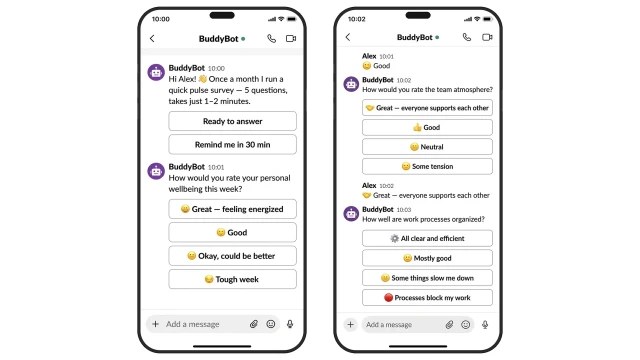
The bot walks each employee through 5 questions in Slack DMs: buttons instead of text fields remove friction and boost participation 2–3× compared to external forms.
The bot asks 5 questions across three areas — responses give an accurate snapshot of team health without open text fields.

What is assessed:
❓ Personal wellbeing: how the employee rates their energy level this week
✅ Scale from "Great — feeling energized" to "Tough week": signals burnout at an early stage
❓ Team atmosphere: how supported the employee feels by their colleagues
✅ If the rating falls below "Neutral", the bot asks a follow-up about the reason
❓ Work processes: whether workflows are getting in the way of doing good work
✅ Frequent negative responses in this area are flagged by AI as a separate trend for HR
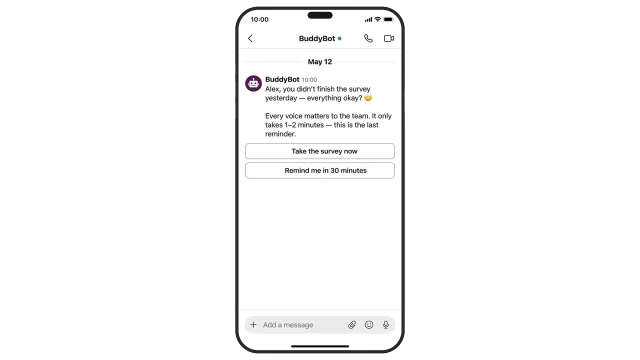
Two automatic reminders — after 30 minutes and the next day — push response rates to 60–80% without any effort from HR.
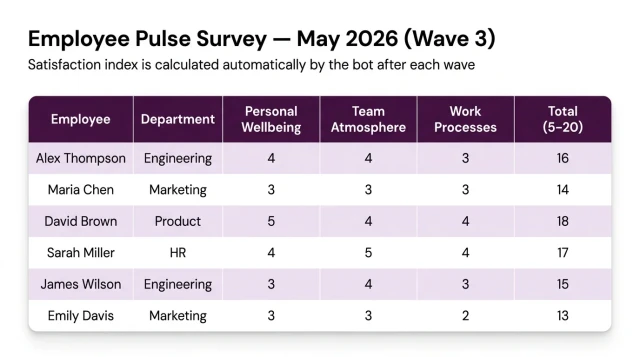
Each wave's results are saved to a table: HR sees a snapshot per employee and can compare trends across waves.
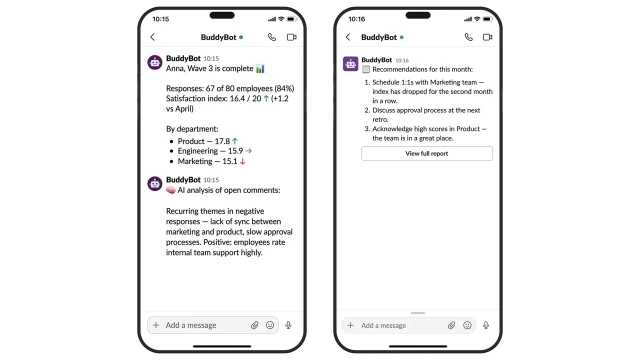
AI analyzes open-ended comments and generates a ready digest for HR: index by department, recurring themes, and specific action recommendations.

How to get started

1. Choose a plan

Business plan from $25/mo — includes everything you need to launch the bot. No coding required.

2. Copy the template and book an onboarding call

After copying the template, schedule a call with our manager — they will help you with setup and configuration.

3. Prepare your pulse survey questions

Customize the questions to fit your company culture. Recommended question blocks:

• How would you rate your personal wellbeing this week?

• How would you describe the atmosphere in your team?

• Do your work processes help you do your job well?

4. Connect your Slack workspace

Our manager will help you add the bot to your workspace and configure the wave schedule.

What else you can connect

Segmentation: different questions for different groups — by department, level, or location.

Excel export: all wave results are available for download from the BuddyBot builder.

Open question at the end: the employee writes a free-form comment, AI includes it in the HR digest.

HubSpot / Zapier integration: sync results with your HR tools automatically.

Frequently asked questions

How long does the survey take?

1–2 minutes. The bot asks 5 questions with ready-made button answers — employees do not type anything manually.

Why is the response rate higher than Google Forms?

The survey arrives where employees already are — in Slack. Two automatic reminders push completion rates to 60–80%, while external forms typically see 20–30%.

What is the satisfaction index 5–20?

Each of the 5 questions is scored from 1 to 4. The minimum total is 5, the maximum is 20. A healthy team typically scores 14–18.

How does AI analyze open-ended comments?

When employees give negative answers, the bot offers them an optional follow-up comment. AI clusters themes across all wave responses and highlights recurring patterns in the HR digest.

Can we customize the questions?

Yes, all questions and answer options are fully editable in the BuddyBot builder with no coding required.

Are employee responses anonymous?

This is configurable. You can enable anonymous mode — in that case HR only sees aggregated data by department, with no attribution to individual employees.

How many employees can be surveyed at once?

Unlimited — the bot sends the survey in parallel to all workspace members or a selected channel.

How often can waves be run?

The schedule is fully customizable: weekly, monthly, or quarterly. The recommended frequency for pulse surveys is once a month.