How to get started
1. Choose a plan with a subscription
The Starter+ plan from $25/mo — includes everything needed to launch the bot.
2. Copy the template and schedule a call
After copying the template, schedule a call with our manager — they will help you with the setup.
3. Prepare your employee list
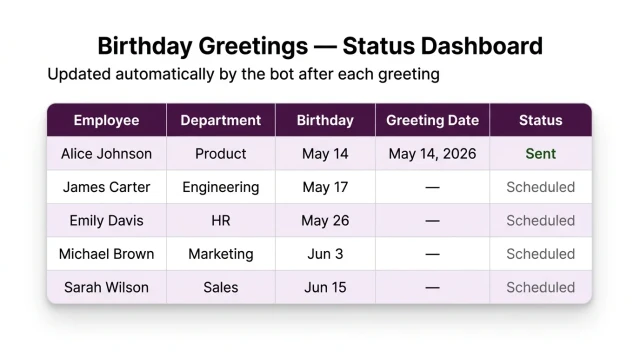
Upload an Excel file with names and birthdays. A table template is available in the bot. Recommended data:
• Full name
• Date of birth
• Department (optional — for channel segmentation)
4. Connect your Slack workspace
Our manager will help add the bot to your workspace and choose the channel for birthday greetings.
What else you can connect
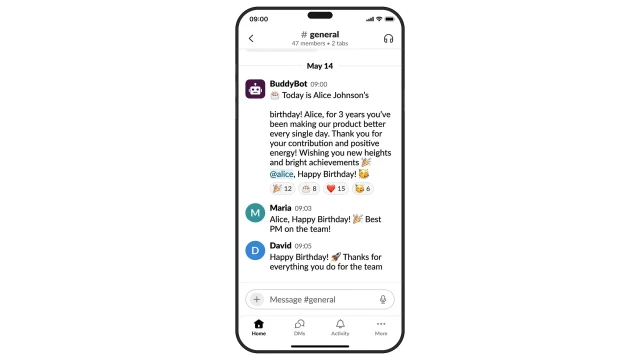
AI greetings: the bot generates a unique message for each birthday person based on their role and interests
HR reminders: the bot sends a DM 1–3 days before a birthday — gives time to prepare a gift
Gift collection: the bot reminds colleagues to chip in and collects emoji reactions
Frequently asked questions
Does the bot work only in Slack?
No, it can be adapted for Telegram, WhatsApp and other channels.
Do I need Slack admin access?
Yes, admin rights are needed to add the bot to the workspace. Takes 3 minutes with our guide.
Can I set different channels for different departments?
Yes, you can specify a separate channel for each department or employee segment.
What if the birthday person is on vacation?
The bot still posts the greeting in the channel on the right day — a great reason to celebrate when they return.
How often do I need to update the list?
Only when hiring or offboarding employees. Otherwise the bot runs autonomously all year.
 Talpha