Talpha









How it works
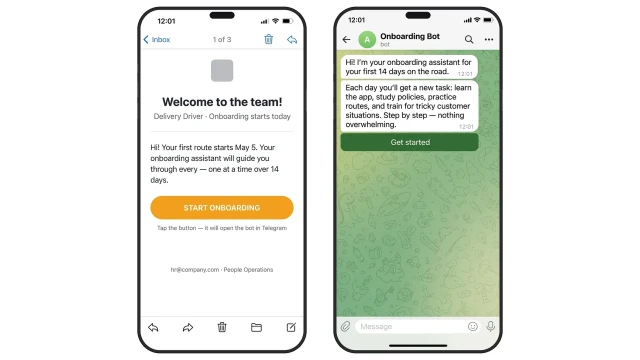
HR sends the new driver a bot link by email or QR code during paperwork. The driver opens the bot in Telegram or WhatsApp and instantly receives a 14-day onboarding plan. The bot guides them step by step: week one covers processes, the app, and routes; week two focuses on independent deliveries and handling tricky situations.
From day one, the driver knows what to do and who to contact — no stack of paper manuals or hours of induction.
Each day, the bot sends the next task from the onboarding plan: what to study, what to complete in the app, what to mark as done.
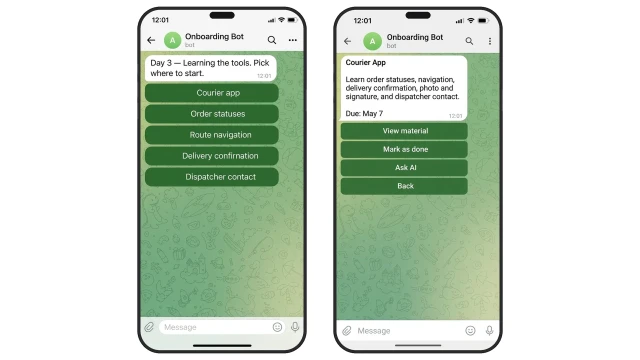
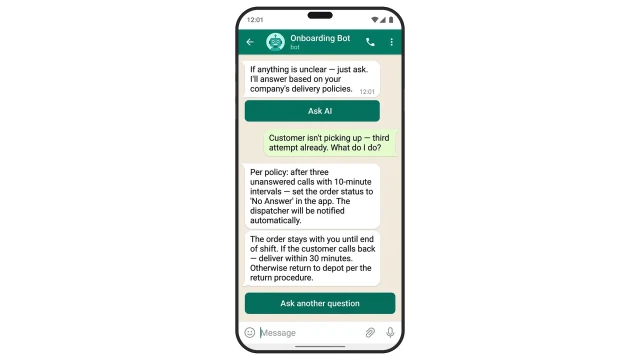
If a driver has a question, the AI assistant answers based on company policies, delivery rules, and the app — no calls to dispatch or a mentor.
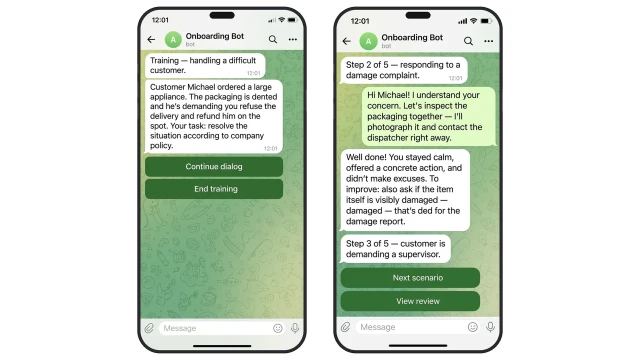
In week two, the bot offers a practice run before a complex route: AI plays a difficult customer and runs a role-play dialogue. The driver practices refused packages, no-answer calls, and rescheduled deliveries — the bot reviews each response.
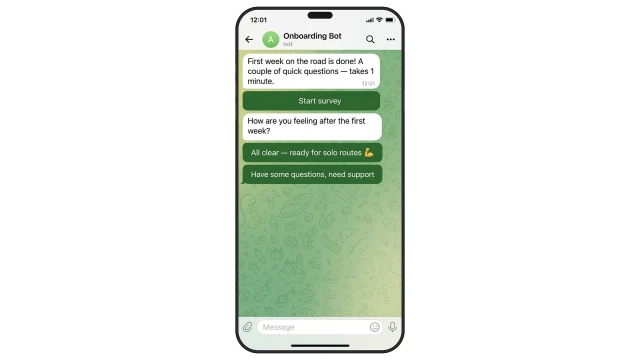
On day 7 and day 14, the bot automatically sends a pulse survey. The manager learns about issues before the driver starts looking for another job.
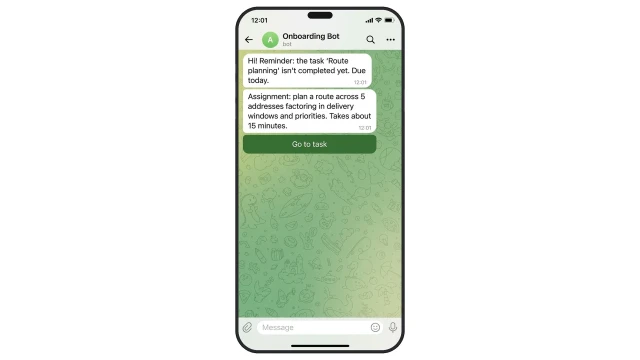
If a driver does not complete a task on time, the bot automatically sends a reminder — no manual follow-up from dispatch or HR.
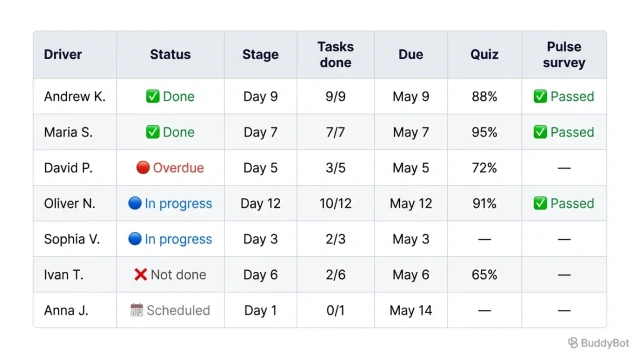
While drivers go through onboarding, the manager sees each person's progress in a shared dashboard: stage, tasks completed, and test results.
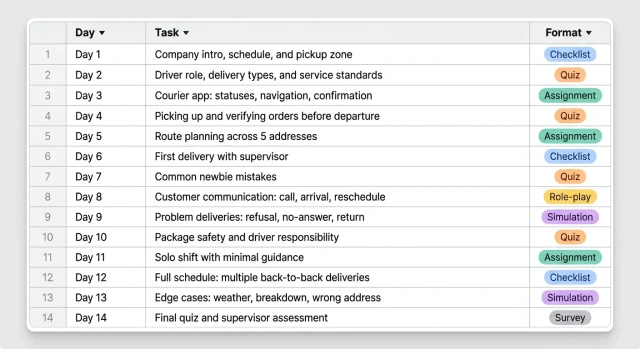
The template comes with a ready-made 14-day delivery driver onboarding plan — tasks load automatically, you just need to adapt them to your routes and processes.
Day 1.
Task: Get acquainted with the company and process.
What to do: Meet the manager and supervisor, learn company rules, schedule, courier app, pickup zone, and communication channels.
How to verify: Day 1 checklist in the bot and a short quiz.
Day 2.
Task: Understand the driver role and job expectations.
What to do: Learn what a shift looks like, types of deliveries, how quality, timing, and service are evaluated.
How to verify: Mini-quiz "What does a courier's job include".
Day 3.
Task: Learn the work tools.
What to do: Courier app, order statuses, navigation, delivery confirmation, photo and signature, dispatcher contact.
How to verify: Practical assignment in the app.
Day 4.
Task: Learn to pick up and verify orders.
What to do: How to check address, contacts, item count, notes, delivery time, and parcel integrity.
How to verify: Scenario — pick up 3 orders.
Day 5.
Task: Learn to plan a route and estimate time.
What to do: Stop order, delivery windows, traffic, buffer time, priorities, and route adjustments during the day.
How to verify: Assignment — plan a route across 5 addresses.
Day 6.
Task: Complete the first delivery.
What to do: Short route supervised by a mentor or dispatcher — meet deadlines, update statuses, confirm delivery.
How to verify: Route and status check in the system.
Day 7.
Task: Review common newbie mistakes.
What to do: Wrong address, late delivery, customer not answering, mixed-up statuses, forgotten delivery confirmation.
How to verify: Case quiz on common mistakes.
Day 8.
Task: Learn customer communication.
What to do: How to call ahead, confirm delivery, announce arrival, and politely discuss rescheduling.
How to verify: Role-play simulation of 3 dialogues.
Day 9.
Task: Handle problem deliveries.
What to do: Customer refusal, no answer, reschedule, failed delivery attempt, parcel return.
How to verify: Scenario test.
Day 10.
Task: Learn package safety and responsibility rules.
What to do: How to handle parcels, what to avoid, how to document damage, and where to report issues.
How to verify: Mini-quiz and safety checklist.
Day 11.
Task: Build confidence for a solo shift.
What to do: Complete a regular route with minimal prompts, use the app and navigation without critical errors.
How to verify: Spot-check by mentor and dispatcher.
Day 12.
Task: Handle a full schedule.
What to do: Multiple back-to-back deliveries, time management, priorities, route adjustments on the fly.
How to verify: Assessment based on actual route completion.
Day 13.
Task: Handle edge cases.
What to do: Address issues, bad weather, vehicle breakdown, customer unreachable, order return.
How to verify: Simulations and scenario review.
Day 14.
Task: Wrap up onboarding and define the next step.
What to do: Final quiz, review of strengths and weaknesses, plan for the next month, confirmation of readiness for solo work.
How to verify: Final status in the bot and supervisor assessment.
Task: Get acquainted with the company and process.
What to do: Meet the manager and supervisor, learn company rules, schedule, courier app, pickup zone, and communication channels.
How to verify: Day 1 checklist in the bot and a short quiz.
Day 2.
Task: Understand the driver role and job expectations.
What to do: Learn what a shift looks like, types of deliveries, how quality, timing, and service are evaluated.
How to verify: Mini-quiz "What does a courier's job include".
Day 3.
Task: Learn the work tools.
What to do: Courier app, order statuses, navigation, delivery confirmation, photo and signature, dispatcher contact.
How to verify: Practical assignment in the app.
Day 4.
Task: Learn to pick up and verify orders.
What to do: How to check address, contacts, item count, notes, delivery time, and parcel integrity.
How to verify: Scenario — pick up 3 orders.
Day 5.
Task: Learn to plan a route and estimate time.
What to do: Stop order, delivery windows, traffic, buffer time, priorities, and route adjustments during the day.
How to verify: Assignment — plan a route across 5 addresses.
Day 6.
Task: Complete the first delivery.
What to do: Short route supervised by a mentor or dispatcher — meet deadlines, update statuses, confirm delivery.
How to verify: Route and status check in the system.
Day 7.
Task: Review common newbie mistakes.
What to do: Wrong address, late delivery, customer not answering, mixed-up statuses, forgotten delivery confirmation.
How to verify: Case quiz on common mistakes.
Day 8.
Task: Learn customer communication.
What to do: How to call ahead, confirm delivery, announce arrival, and politely discuss rescheduling.
How to verify: Role-play simulation of 3 dialogues.
Day 9.
Task: Handle problem deliveries.
What to do: Customer refusal, no answer, reschedule, failed delivery attempt, parcel return.
How to verify: Scenario test.
Day 10.
Task: Learn package safety and responsibility rules.
What to do: How to handle parcels, what to avoid, how to document damage, and where to report issues.
How to verify: Mini-quiz and safety checklist.
Day 11.
Task: Build confidence for a solo shift.
What to do: Complete a regular route with minimal prompts, use the app and navigation without critical errors.
How to verify: Spot-check by mentor and dispatcher.
Day 12.
Task: Handle a full schedule.
What to do: Multiple back-to-back deliveries, time management, priorities, route adjustments on the fly.
How to verify: Assessment based on actual route completion.
Day 13.
Task: Handle edge cases.
What to do: Address issues, bad weather, vehicle breakdown, customer unreachable, order return.
How to verify: Simulations and scenario review.
Day 14.
Task: Wrap up onboarding and define the next step.
What to do: Final quiz, review of strengths and weaknesses, plan for the next month, confirmation of readiness for solo work.
How to verify: Final status in the bot and supervisor assessment.