Talpha









How it works
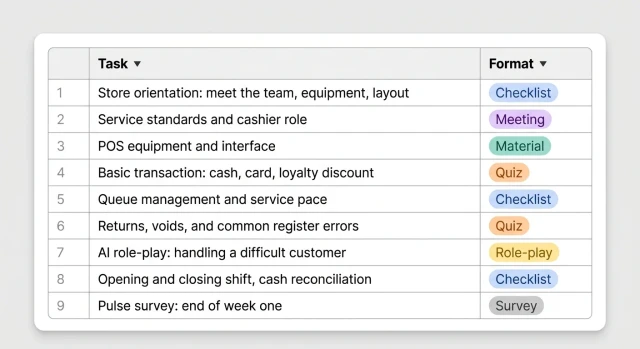
HR sends the new cashier a bot link — via email, QR code, or automatically upon hiring. The cashier opens the bot in Telegram or WhatsApp and immediately gets a 14-day plan. The bot guides through each stage — equipment and standards in week one, AI role-play and solo shifts by the end.
From day one, the cashier knows what to do and who to ask — no stack of manuals, no hour-long orientation session.
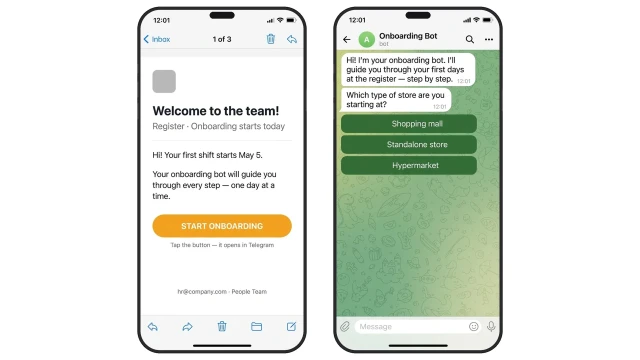
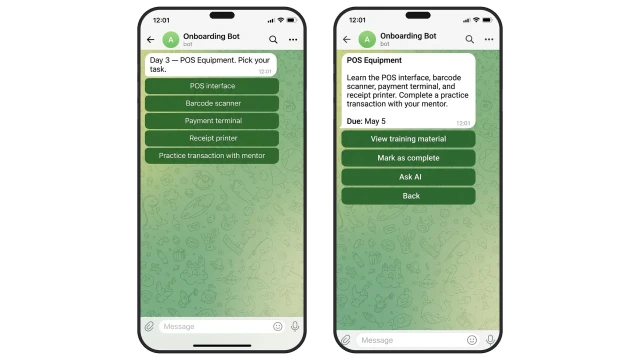
Each morning the bot delivers the task of the day: what to study about the POS system, which policy to read, what to mark as done.
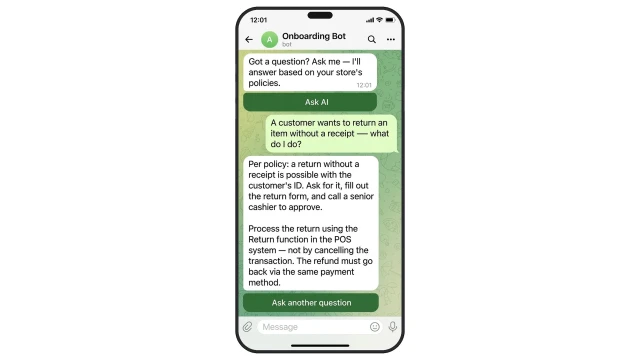
If the cashier has a question, the AI assistant answers from the company knowledge base — return policies, register procedures, equipment — without involving HR or a mentor.
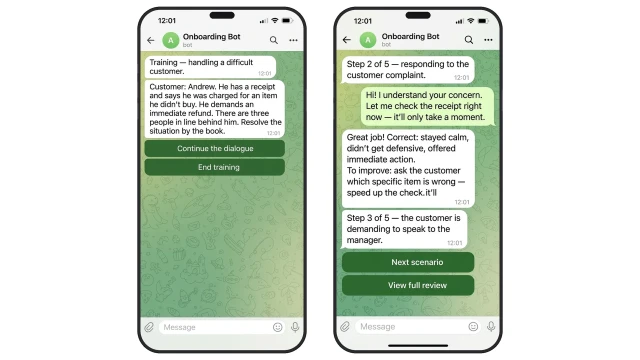
In week two, the bot offers practice before the first solo shift: AI plays a difficult customer and runs a role-play based on real cashier scenarios. The cashier responds, the bot reviews each answer — what worked and what to improve.
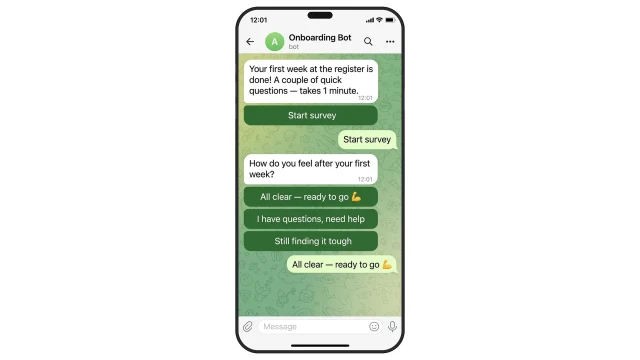
On day 7 and day 14, the bot automatically sends a pulse survey. The manager learns about difficulties before the new cashier starts looking for another job.
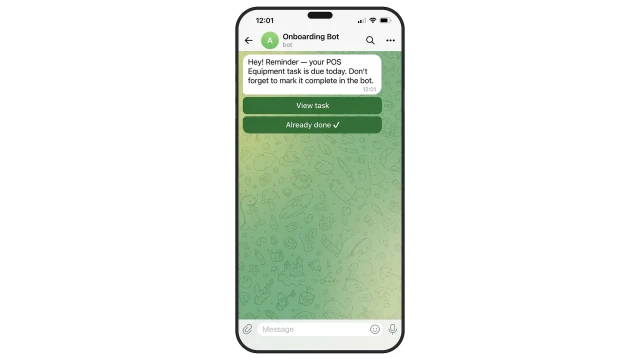
If a cashier misses a task deadline, the bot automatically sends a reminder — no manual follow-up from HR or management.
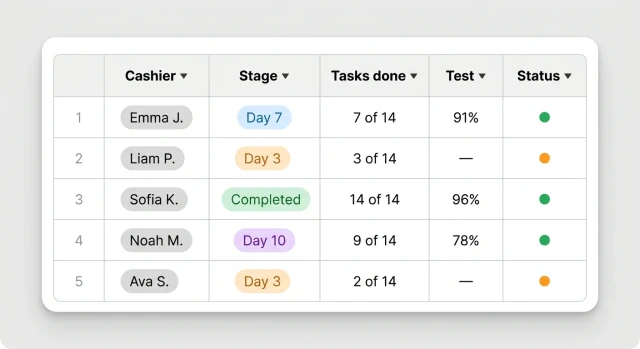
While the cashier goes through onboarding, the manager sees everyone's progress in one dashboard: current stage, tasks completed, test score.
The template comes with a ready-made 14-day cashier onboarding plan — tasks load automatically. Just adapt them to your own policies and store layout.
Day 1.
Task: Reduce anxiety, meet the team and workplace.
What to do: Meet your mentor, get to know the team. Walk the store floor, learn the layout. Sort out logistics: access cards, uniform, workstation.
How to verify: Complete the Day 1 checklist in the bot.
Day 2.
Task: Service standards and cashier role.
What to do: Study customer service standards, dress code, and register conduct rules. Take the standards quiz.
How to verify: Complete the quiz in the bot.
Day 3.
Task: POS equipment and interface.
What to do: Learn the POS interface, barcode scanner, payment terminal, and receipt printer. Complete a practice transaction with your mentor.
How to verify: Practice transaction done — mark in the bot.
Day 4.
Task: Complete a basic sale.
What to do: Process a cash payment, card payment, and loyalty discount. Issue a receipt and give correct change.
How to verify: Complete the POS operations quiz in the bot.
Day 5.
Task: Queue management and service pace.
What to do: Practice service speed and queue management rules. Complete first independent sales under mentor supervision.
How to verify: Mentor evaluation recorded in the bot.
Day 6.
Task: Returns, voids, and common register errors.
What to do: Study the return policy, void procedure, and actions for register errors. Take the non-standard situations quiz.
How to verify: Complete the quiz in the bot.
Day 7.
Task: Opening and closing shift, cash reconciliation.
What to do: Study the shift opening and closing procedure, cash collection, and Z-report reconciliation. Pulse survey at the end of week one.
How to verify: Complete the checklist and pulse survey in the bot.
Day 8.
Task: AI role-play — handling a difficult customer.
What to do: Complete 3–5 training role-play scenarios with AI as the difficult customer. Receive feedback on each response.
How to verify: Finish the training session in the bot.
Days 9–10.
Task: Advanced equipment handling and non-standard situations.
What to do: Practice rare operations: multi-day returns, split payments, gift cards. Independent shift under supervision.
How to verify: Results recorded in the bot.
Days 11–13.
Task: Independent shifts and skills consolidation.
What to do: Complete several independent shifts. Review any outstanding questions with the mentor. Take the final quiz.
How to verify: Final quiz passed with at least 80%.
Day 14.
Task: Final evaluation and clearance for independent shifts.
What to do: Meeting with the manager, debrief. Pulse survey on onboarding completion. If evaluation is positive — cleared for independent shifts.
How to verify: Manager evaluation in the bot, status "Onboarding complete".
Task: Reduce anxiety, meet the team and workplace.
What to do: Meet your mentor, get to know the team. Walk the store floor, learn the layout. Sort out logistics: access cards, uniform, workstation.
How to verify: Complete the Day 1 checklist in the bot.
Day 2.
Task: Service standards and cashier role.
What to do: Study customer service standards, dress code, and register conduct rules. Take the standards quiz.
How to verify: Complete the quiz in the bot.
Day 3.
Task: POS equipment and interface.
What to do: Learn the POS interface, barcode scanner, payment terminal, and receipt printer. Complete a practice transaction with your mentor.
How to verify: Practice transaction done — mark in the bot.
Day 4.
Task: Complete a basic sale.
What to do: Process a cash payment, card payment, and loyalty discount. Issue a receipt and give correct change.
How to verify: Complete the POS operations quiz in the bot.
Day 5.
Task: Queue management and service pace.
What to do: Practice service speed and queue management rules. Complete first independent sales under mentor supervision.
How to verify: Mentor evaluation recorded in the bot.
Day 6.
Task: Returns, voids, and common register errors.
What to do: Study the return policy, void procedure, and actions for register errors. Take the non-standard situations quiz.
How to verify: Complete the quiz in the bot.
Day 7.
Task: Opening and closing shift, cash reconciliation.
What to do: Study the shift opening and closing procedure, cash collection, and Z-report reconciliation. Pulse survey at the end of week one.
How to verify: Complete the checklist and pulse survey in the bot.
Day 8.
Task: AI role-play — handling a difficult customer.
What to do: Complete 3–5 training role-play scenarios with AI as the difficult customer. Receive feedback on each response.
How to verify: Finish the training session in the bot.
Days 9–10.
Task: Advanced equipment handling and non-standard situations.
What to do: Practice rare operations: multi-day returns, split payments, gift cards. Independent shift under supervision.
How to verify: Results recorded in the bot.
Days 11–13.
Task: Independent shifts and skills consolidation.
What to do: Complete several independent shifts. Review any outstanding questions with the mentor. Take the final quiz.
How to verify: Final quiz passed with at least 80%.
Day 14.
Task: Final evaluation and clearance for independent shifts.
What to do: Meeting with the manager, debrief. Pulse survey on onboarding completion. If evaluation is positive — cleared for independent shifts.
How to verify: Manager evaluation in the bot, status "Onboarding complete".