header.phone_number boris@borisbot.com

Collect Team Dues in Slack: automated payment bot

Bot announces collection in Slack channel, accepts one-click Stripe payment, and reminds non-payers.

You need to log in to see the interactive example.

You need to log in to see the interactive example

From the user Borisbot

Copyright protection from copying

landing.complain

The organizer adds a participant list and contribution amount — for a colleague's gift, team lunch, or company event. The bot posts an announcement in the Slack channel with a "Pay" button, accepts payments via Stripe, and automatically updates statuses. Those who haven't paid receive a personal reminder — no manual follow-ups, no chasing transfers.

Why it works

💸 One-click payment — right in Slack, no QR codes or bank transfers

🔔 Reminds non-payers automatically — no need to message each person

📊 Real-time statuses — see who has paid and who hasn't

🔄 Any occasion — gifts, lunches, team events, office expenses

Solution KPIs

⏱ −1-2 hours saved per collection — bot handles what was done manually

💳 100% online payments — no cash, no bank transfers

✅ Reminders sent automatically — organizer saves time

📋 All statuses in one table — full transparency for the team

Who it's for

Based on an office gift collection example, adapts for any team dues scenario: HR managers, team leads, event organizers, office managers, Slack workspace admins.

Launch: upload participant list → set amount and occasion → bot starts immediately.

How it works

The bot works in three steps: the organizer launches a collection and uploads a participant list, the bot posts an announcement in the Slack channel with a payment button, and participants pay directly in the messenger. Non-payers receive automatic reminders, and statuses update in real time in the table.

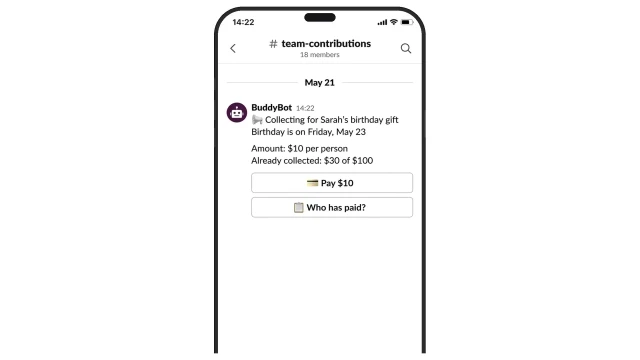
The bot announces the collection in the channel — participants see the amount and pay with one click right in Slack. No bank transfers, no manual tracking.

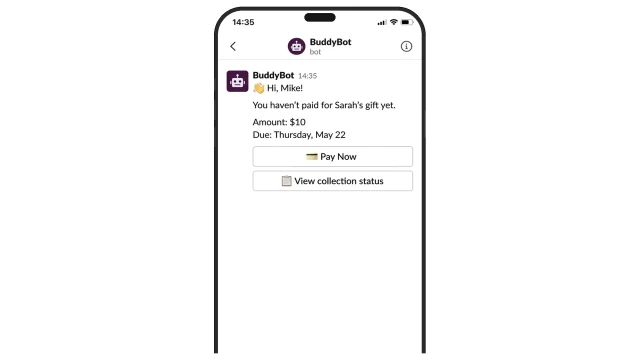
Non-payers get a personal message with the amount, deadline, and payment button. The organizer doesn't spend time on follow-up messages.

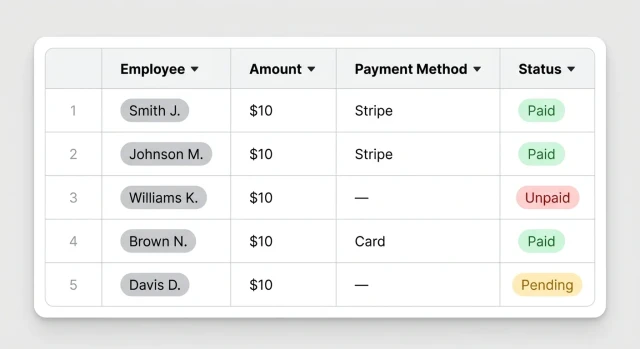
All statuses in one table: who paid, by which method, who hasn't. The organizer sees the full picture in real time.

How to get started

1. Subscribe to the Starter+ plan

Starter+ plan from $25/mo — includes everything needed to launch the bot.

2. Copy the template and schedule a setup call

A BuddyBot manager will configure the scenario for your needs: collection type, participant list, payment system. No coding required.

3. Connect your payment system

Stripe is supported — the manager will help with setup.

4. Add the bot to your Slack workspace

The manager will send connection instructions. The bot joins the channel and can post announcements.

5. Done — launch your first collection

Set the occasion, amount, and participant list. The bot announces in the channel and starts accepting payments immediately.

What else you can connect

📊 Excel import — upload your participant list from a file

📋 BuddyBot Tables — manage participants and statuses directly in the service

🔔 Multiple collections — run several collections simultaneously for different groups

Frequently asked questions

How does the bot accept payment in Slack?

The bot sends a payment button to the channel or direct message. The participant clicks it — a Stripe payment page opens. After a successful payment, the status updates automatically.

Do participants need to install an app?

No, the bot works directly in Slack — employees use the messenger they already know.

What payment systems are supported?

Stripe. Setup takes 1 day — a BuddyBot manager helps with the configuration.

What if a participant doesn't pay after a reminder?

The bot sends a repeat reminder on schedule. The organizer can see who hasn't paid in the table and reach out manually.

Can we run multiple collections at once?

Yes, you can launch collections for different occasions and different channels simultaneously.

How often does the bot send reminders?

Configurable individually — for example, 3 days before the deadline and on the due date. Reminders only go to those who haven't paid yet.

How many participants can be in one collection?

No limit — the bot works with any number of participants in the channel.

How does the organizer receive the money?

Payments go directly to the organization's Stripe account. The bot only tracks statuses and manages communication.